
Running a small business often means switching between dozens of responsibilities every day. One minute you’re answering a client email, the next you’re working on a proposal, creating marketing content, updating a spreadsheet, or trying to remember what needs to happen next on an important project.
The challenge isn’t always knowing what needs to be done. It’s keeping everything organized and actually getting it done.
That is where VirtualExec.io can become part of your everyday workflow.
VirtualExec isn’t designed to replace the way you already work. Instead, it gives you an AI-powered business assistant that can help turn ideas, requests, and unfinished work into organized tasks, projects, documents, and actionable next steps.
The key is to stop thinking of VirtualExec as something you use only when you have a big project.
The real value comes from making it part of your daily routine.
Start Your Day With VirtualExec
A productive day starts with knowing what deserves your attention.
Instead of opening your email, social media, spreadsheets, and project management tools and trying to figure out where to begin, you can start your day by asking VirtualExec:
“What should I focus on today?”
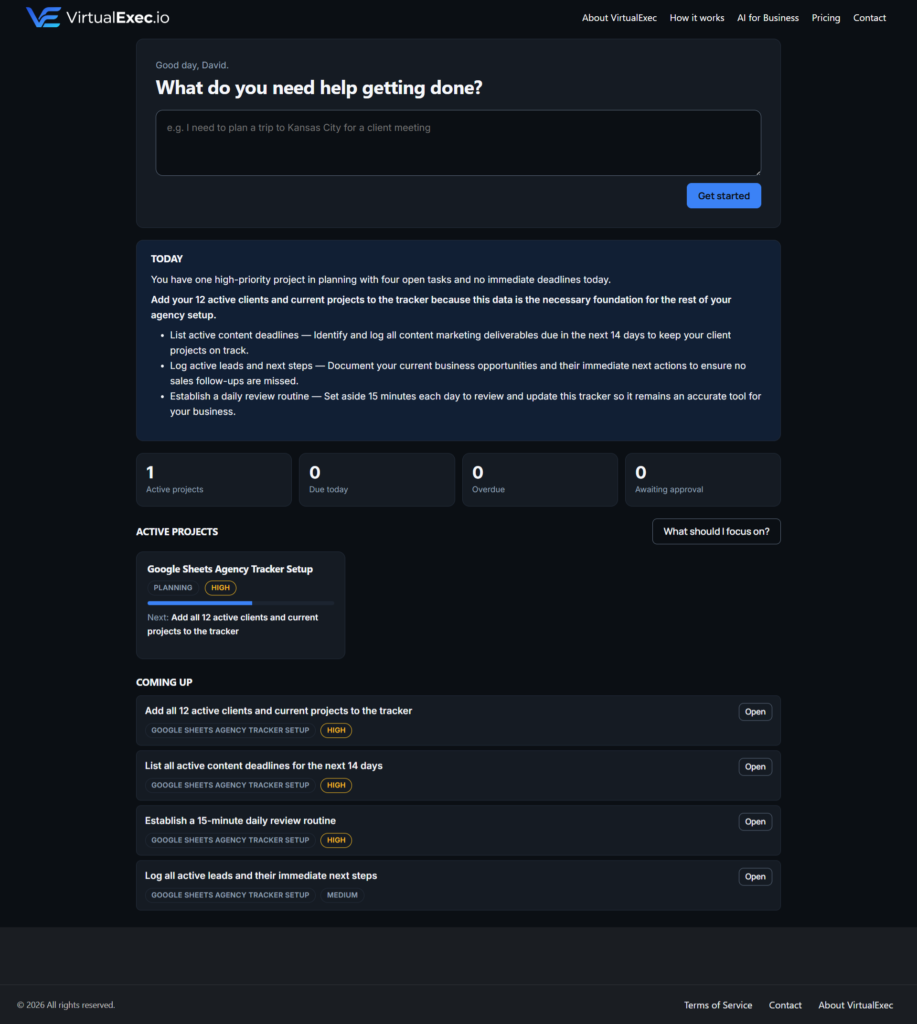
Your VirtualExec dashboard can give you a quick view of your active projects, upcoming tasks, deadlines, priorities, and items that may need your attention.
This creates a simple morning workflow:
Review → Prioritize → Act
For example, your morning might look like this:
- Review your active projects
- Check tasks due today
- Look for overdue or high-priority work
- Review upcoming deadlines
- Identify the most important task to complete first
- Ask VirtualExec for help with that task
Instead of spending 30 minutes deciding what to work on, you can spend those 30 minutes actually working.
Turn Ideas Into Tasks
Small-business owners have ideas constantly.
You might think:
“I need to update the website.”
“We should create a newsletter.”
“I need to follow up with that potential client.”
“Let’s create a social media campaign for next month.”
Without a system, these ideas can quickly become mental clutter.
VirtualExec can help turn those ideas into actionable work.
Rather than simply recording an idea and forgetting about it, you can give VirtualExec a request such as:
“Create a project for launching our new service and break it into the major tasks we need to complete.”
Now you have something you can actually work from.
The difference is important.
An idea is something you want to do. A task is something you can act on.
Use VirtualExec When You Start a Project
One of the best ways to incorporate VirtualExec into your workflow is to make it the starting point for new projects.
Instead of immediately opening a blank document or spreadsheet, start with the objective.
For example:
“Help me create a marketing plan for my local landscaping business.”
VirtualExec can help you develop the project, organize the work, identify the necessary steps, and create useful deliverables.
You can use the same approach for projects such as:
- Business plans
- Marketing campaigns
- Content calendars
- Client projects
- Research projects
- Business proposals
- Standard operating procedures
- Website projects
- Sales initiatives
- Customer retention programs
- Internal business planning
The goal isn’t simply to have AI generate information.
The goal is to move from an idea to an organized project you can execute.
Make VirtualExec Part of Your Content Workflow
Content marketing is another area where an everyday AI workflow can save considerable time.
Instead of sitting down once a month and trying to figure out what to publish, use VirtualExec throughout the process.
For example:
Monday — Plan
Ask:
“Create this week’s content plan for my business.”
Tuesday — Create
Ask:
“Create a blog article based on this week’s topic.”
Wednesday — Repurpose
Ask:
“Turn this article into social media posts for Facebook and LinkedIn.”
Thursday — Review
Ask:
“Review these posts and suggest improvements.”
Friday — Plan Ahead
Ask:
“Create next week’s content ideas based on our current marketing goals.”
This turns content creation into a repeatable workflow rather than a task you constantly have to start from scratch.
Use It for Client and Customer Work
If your business works with clients, VirtualExec can also become part of your client-management workflow.
For example, after a client meeting, you could use VirtualExec to help organize the follow-up:
“Turn these meeting notes into a list of action items, priorities, and next steps.”
You can then use those tasks to keep the project moving.
The same approach can work for customer service and sales:
- Organize follow-up activities
- Prepare customer communications
- Develop proposals
- Research prospects
- Create sales materials
- Plan customer retention campaigns
- Document processes
- Prepare meeting agendas
- Summarize information
- Create internal documentation
Instead of letting information from meetings and conversations disappear into an inbox or notebook, you can turn it into actionable work.
Let VirtualExec Help With the Work Between Meetings
One of the biggest advantages of an AI business assistant is that it can help with the work that happens between the major events of your day.
Consider a typical business owner:
8:00 AM: Review priorities
9:00 AM: Client meeting
10:30 AM: Follow-up tasks
12:00 PM: Marketing
2:00 PM: Project work
4:00 PM: Administrative work
There are dozens of small decisions happening between those blocks.
VirtualExec can help with many of them.
Need a document?
Ask for it.
Need research organized?
Ask for it.
Need a project broken into tasks?
Ask for it.
Need help deciding what comes next?
Ask.
The objective is to reduce the amount of time you spend figuring out how to approach the work so you can spend more time completing it.
Use the Dashboard as Your Daily Command Center
Your VirtualExec dashboard is designed to give you a central view of your work.
Instead of keeping your priorities entirely in your head, you can use the dashboard to keep track of active projects and upcoming work.
A typical dashboard workflow might look like:
Active Projects
See what you’re currently working on.
Upcoming Tasks
Know what needs to happen next.
Priorities
Identify the work that deserves immediate attention.
Deadlines
Keep important dates from getting lost.
Focus
When you’re not sure where to start, ask VirtualExec what you should focus on.
This creates a simple principle:
Don’t manage your business from memory. Manage it from a system.
End Your Day by Preparing for Tomorrow
VirtualExec can also be useful at the end of the workday.
Before shutting down for the evening, take a few minutes to review your work.
You might ask:
“Review my current projects and help me identify what I should focus on tomorrow.”
This gives you an opportunity to:
- Review unfinished tasks
- Identify priorities
- Look at upcoming deadlines
- Capture new ideas
- Organize tomorrow’s work
- Make sure important follow-ups aren’t forgotten
Instead of ending the day wondering what you need to remember tomorrow, you can start tomorrow with a plan.
A Simple Everyday VirtualExec Routine
You don’t need to completely change the way you run your business to start using VirtualExec.
Start with a simple routine.
Morning
Ask:
“What should I focus on today?”
Review your priorities and upcoming tasks.
During the Day
Ask:
“Help me get this done.”
Use VirtualExec when you need help planning, researching, creating, organizing, or completing work.
When Something New Comes Up
Ask:
“Turn this into a project and break it into tasks.”
Capture the work before it gets forgotten.
End of Day
Ask:
“What still needs my attention?”
Review unfinished work and prepare for tomorrow.
Once a Week
Ask:
“Review my active projects and help me prioritize next week’s work.”
Use the bigger picture to keep your business moving forward.
You Don’t Have to Use AI for Everything
Incorporating VirtualExec into your workflow doesn’t mean handing your entire business over to AI.
You remain in control.
Think of VirtualExec as another member of your business support team—one that is available when you need help organizing information, developing ideas, creating deliverables, planning projects, or figuring out what comes next.
You decide what gets done.
VirtualExec helps you get there.
The Goal Is Better Workflow, Not More Technology
The biggest mistake businesses can make with AI is using it simply because it’s available.
The goal shouldn’t be to add another technology platform to your business.
The goal should be to make your existing workflow easier and more productive.
VirtualExec fits into that workflow by helping you move through the process:
Idea → Plan → Tasks → Work → Deliverables → Review → Next Steps
Once that process becomes habitual, VirtualExec becomes less like another tool you have to remember to use and more like a natural part of how you run your business.
Make VirtualExec Part of Your Workday
You don’t need to start with a complicated implementation.
Start tomorrow morning.
Open VirtualExec and ask:
“What do I need to get done today?”
Then use it throughout the day whenever you encounter a task, project, idea, or problem that could benefit from AI-powered business support.
The more naturally it becomes part of your workflow, the more useful it can become.
Your business already has enough moving parts. Your AI assistant should help bring them together—not add another layer of complexity.
Ready to put AI to work? Visit VirtualExec.io and see how an AI-powered business assistant can become part of your everyday workflow.
Get Started